Author: Noman

  • 2008/9s blogging era -a trip down memory lane

    Here’s a retrospective of the 2008/2009 internet from my point of view.

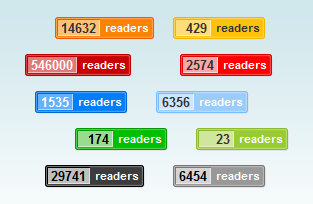
    Feedburner feed counter

    Each of the blogs comes with an RSS feed. You can run it through a service called Feedburner and see how many people (or bots) read your blogs every day. It also came with a nice counter you can proudly display in your blog sidebar.

    I would check my blog every day to see the updated reader count. It gave me a little ego boost every time it increased.

    Entrecard

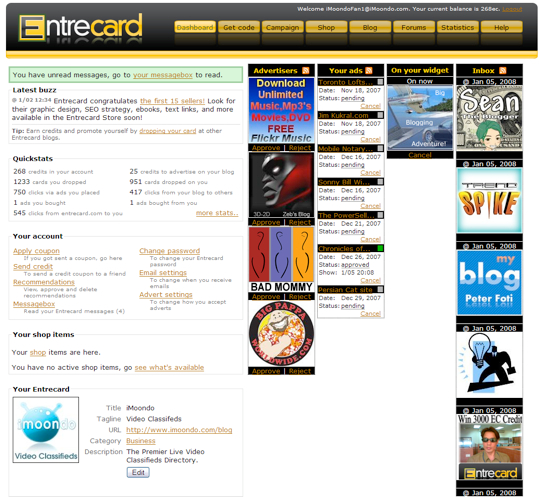
    It was a square ad code we would put into our blog sidebars. This service served as free advertising for bloggers.

    The card had two parts: the ad and the drop button. Every time you visit a blog’s Entrecard widget, you can click the button and drop a virtual “card” which acts as the currency on this service. For every card drop you earn a credit, while the blog owner also earned credits.

    At the end of the day, you can check your dashboard to see how many credits you earned. Using the credits you can place your ad on other popular blog. This worked as a discovery platform for blogs.

    Read more about Entrecard in this 2008 interview from Problogger

    StumbleUpon

    It was a browser toolbar for Firefox and other web browsers. By clicking the “Stumble” button on the toolbar, you would be taken to a random and interesting webpage. It was a fun way to find internet viral things. I found out about Codecademy through this service.

    Apart from discovering new pages, we could also submit our own blog pages and hope they get picked up by the StumbleUpon algorithm. It was a common practice to “Stumble” (vote) each other’s blog posts.

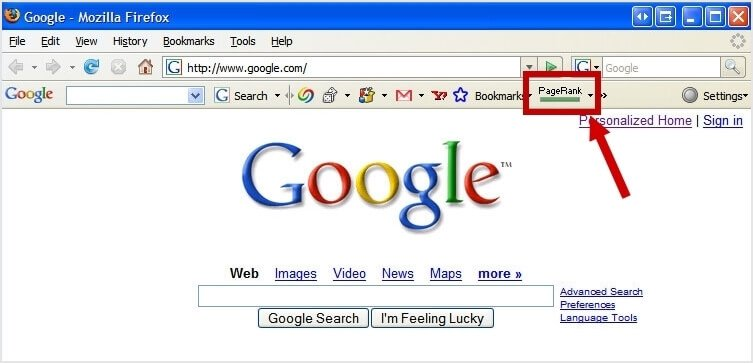
    Google Page Rank Toolbar

    Back then, every website and page had a thing called “Page Rank”. There were toolbars to show your blog’s page rank. Every 3 or 4 months, Google would update its public rankings. My blog had a page rank of 3/10. It was a common practice to sell and exchange links to each other in hopes to gain higher rankings.

    Toolbars

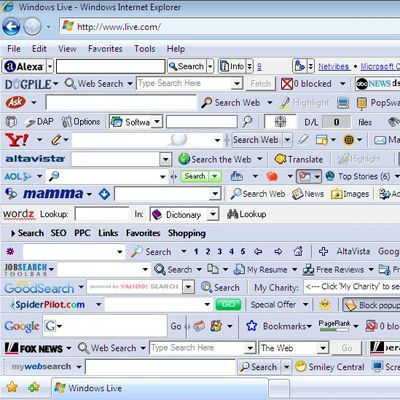
    As you can see, Toolbars were a thing back in the day.

    Before Google Chrome came along, almost every internet service had its own toolbar. Anytime you go to their site, they ask you to install their toolbar to quickly use their app.

    As a result, sometimes your browser would end up something like this:

    I had a tiny 1024×768 resolution monitor. Now imagine how hard it was to navigate the 2008 era internet through these invasive toolbars?

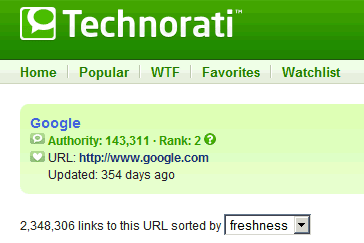
    Technorati blog rank

    It was yet another blog ranking score you could have. The Technorati widget and toolbar showed where your blog ranks based on popularity. It was very similar to the Google page rank mentioned above.

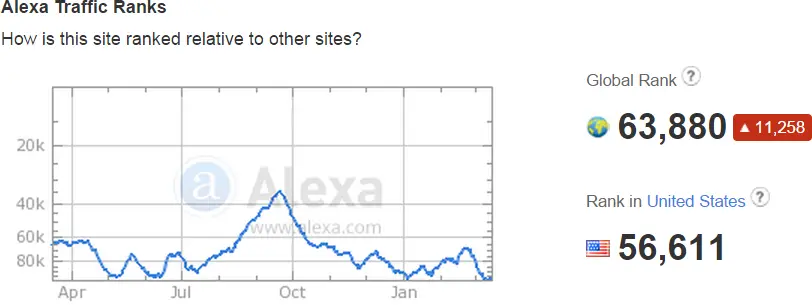
    Alexa site rank

    While we are on the topic of site ranks, there was yet another popular site ranking tool. Before Alexa was a voice assistant, it was called a site ranking toolbar:

    Other than Google’s page rank, the Alexa rank was the next most important factor in blog valuation.

    Digg.com

    It was a site similar to Reddit, you could submit your blog posts and get diggs (upvotes)

    I mostly remember about the Digg the candidates campaign, when Digg featured 2008 US presidential candidates on their site.

    Twitter and related services

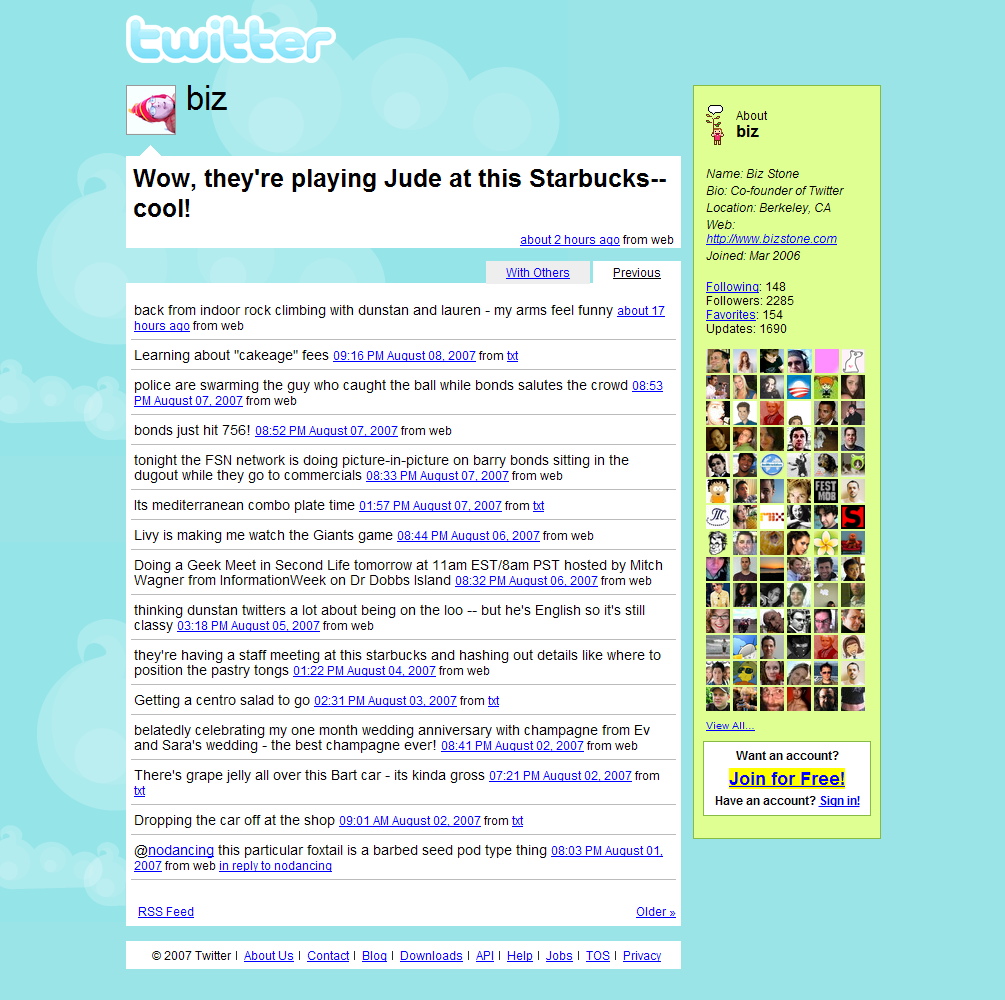
    Back in the day, Twitter was just getting started. It had an API, and it spun a range of services.

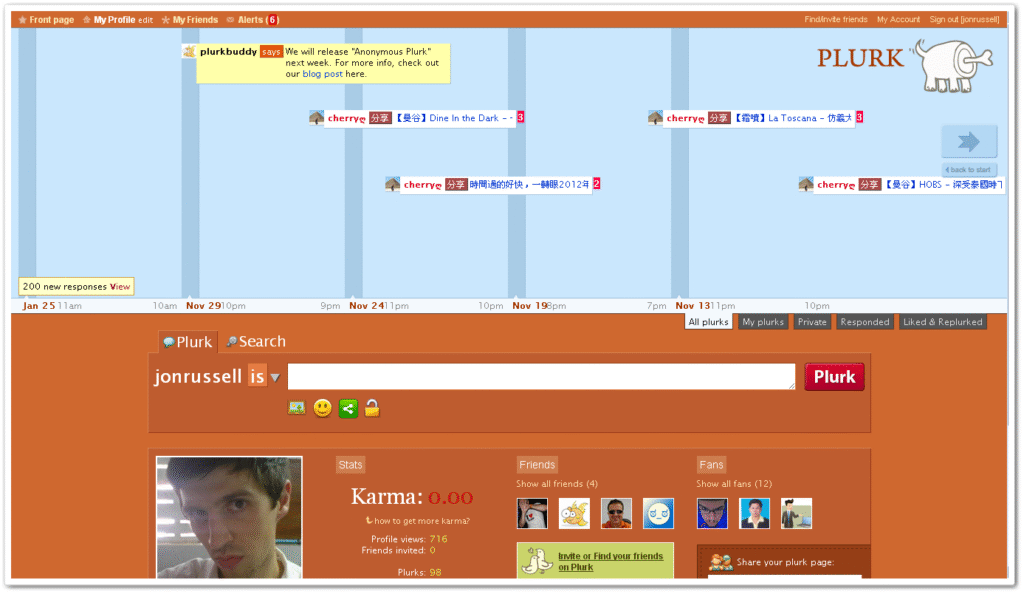
    Twitter started as a “Micro” blogging platform. It was not the only one of its kind. Many Twitter copycats came out with their unique twist. One of them was Plurk. I opened accounts in both Twitter and Plurk.

    Twitter didn’t have images back then. One such service that popped up solving this problem was TwitPic. You could connect to this site and upload an image to TwitPic and put the image link to Twitter.

    TinyURL.com

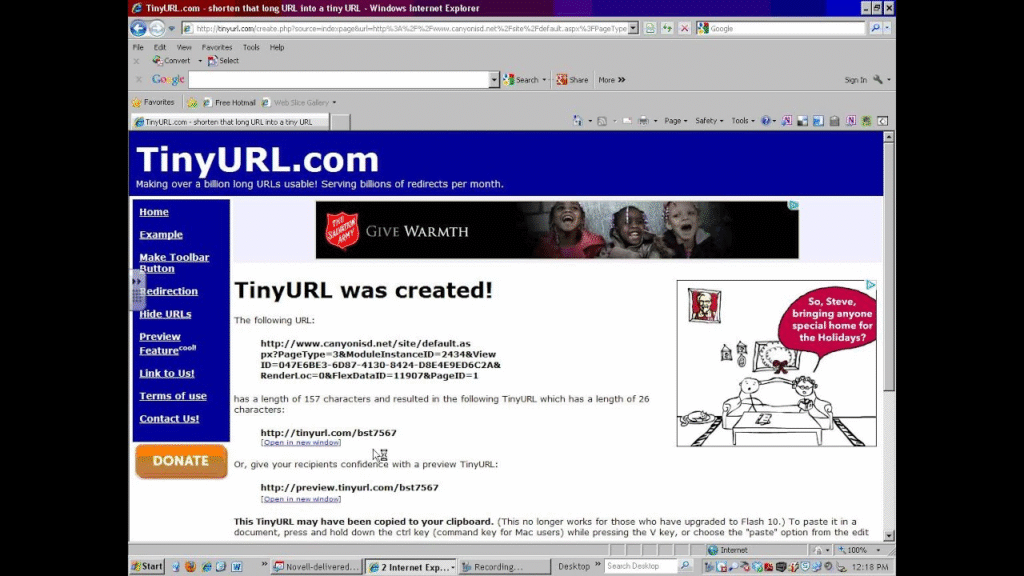
    Twitter had a limit of 140 characters, so long links were an issue. TinyURL was an interesting project -a service that turns long links to tiny URLs:

    This gave rise to some more services:

    • Ow.ly
    • Bit.ly
    • Ad.ly

    And many more.

  • Tangem Card Lifespan and Replacement Economics: Cost Analysis for 10-Year Cryptocurrency Storage

    A cryptocurrency holder planning to store significant assets for a decade faces a practical question that extends beyond initial purchase price. Hardware wallets like Tangem cards offer genuine security advantages—offline key storage, elimination of battery and cable dependencies, and cryptographic operations confined to a secure chip. But those advantages come with embedded costs that accumulate over time: card replacement, backup card maintenance, mobile operating system changes, and the possibility that application compatibility shifts unexpectedly. The true cost of ownership is not what you pay on day one. It is the total capital and operational expense across ten years of storage.

    This analysis constructs a financial model that accounts for realistic replacement scenarios, backup card management, and the hidden costs of technological drift. A Tangem crypto wallet offers legitimate advantages for long-term storage because its hardware design—water resistance, no batteries, no screens to fail—minimizes maintenance burden compared to traditional hardware wallets. Yet the model reveals that ownership cost is not linear. Early purchasing decisions compound into later expenses, and the choice between primary cards, backup cards, and replacement strategies creates different risk profiles with measurably different financial outcomes.

    Tangem card and backup card system illustrating long-term storage economics and replacement cycles

    The case for durable hardware over battery-dependent alternatives

    Tangem’s physical design shapes its long-term cost profile. A standard hardware wallet often depends on a battery, a USB interface, or both. Batteries degrade, connectors corrode, and screens can develop dead pixels or fail entirely. A typical lithium battery has a useful life of three to five years under normal conditions. Replacement requires either sending the device to the manufacturer or discarding it and purchasing a new unit. The Tangem card eliminates those failure modes. It has no battery, no USB cable, no screen. Water and dust resistance mean it can survive storage conditions that would destroy other devices. This engineering choice directly translates to lower maintenance costs over a decade.

    The economic advantage becomes clear when comparing failure rates across ten years. A battery-dependent wallet purchased today would likely require at least one battery replacement or device replacement cycle within the storage period. Even if the manufacturer offers battery service, shipping time, processing fees, and the risk of keys being exposed during the repair process all impose real costs. Tangem’s passive design eliminates that entire category of expense. The card requires no maintenance, no charging, no periodic testing to verify that hardware is still functional. For a user who purchases a card, stores it securely, and touches it only a few times per year to verify it still works, the lack of degrading components is a measurable financial advantage.

    However, durability alone does not determine total ownership cost. The card itself may fail, though Tangem’s design makes component-level failure less likely than with other hardware wallets. More importantly, the ecosystem around the card—the mobile application, blockchain support, and communication protocols—will evolve whether or not the physical card remains intact. A perfectly durable card becomes less useful if the app is no longer maintained, if the operating system discontinues NFC support, or if the protocols the wallet uses become obsolete. Long-term ownership cost therefore includes both the physical device and the digital infrastructure that makes it functional.

    The seedless backup system offered by Tangem cards introduces another cost dimension. Instead of storing a single recovery seed phrase, users create multiple backup cards that can restore the wallet. This approach has advantages—no paper seed to photograph, no single written record to steal—but it increases the initial outlay. A primary card plus two backup cards represents three times the per-unit cost compared to a single traditional hardware wallet. Distributed storage across multiple physical objects also increases the organizational burden and the number of locations where the user must maintain security and retrieval procedures.

    Initial capital structure and backup card strategy

    The first financial decision is whether to purchase one card, one card plus one backup, or one card plus two backups. Tangem cards typically cost between $19 and $30 each at retail. A primary card costs $20 to $30. Each backup card adds the same amount. A minimal setup—primary plus one backup—runs $40 to $60 upfront. A more conservative setup with primary plus two backups costs $60 to $90. This initial purchase is not a one-time expense; it is the first installment in a replacement strategy that extends across ten years.

    The choice between one and two backups represents different risk tolerances and cost profiles. With a single backup, the user has one opportunity to restore the wallet if the primary card is lost, damaged, or fails. If that backup is misplaced, damaged, or becomes inaccessible when needed, wallet recovery becomes impossible—not because the coins have been lost, but because the user cannot access the recovery mechanism. A two-backup strategy accepts higher initial cost in exchange for redundancy. Even if one backup card is lost, a second remains available. This is mathematically equivalent to insurance: you pay more now to reduce the probability of total loss later.

    Card replacement timing during the ten-year horizon creates another decision tree. Tangem cards are passive devices with no intrinsic degradation mechanism, so replacement is typically driven by loss, damage, or obsolescence rather than wear. A conservative user might replace cards every five years proactively, treating the replacement cost as preventive maintenance against the risk of sudden failure when needed. A aggressive approach is to replace only when necessary, deferring expense until a problem emerges. The financial outcome depends on whether the delayed replacement occurs during a period of rising prices, ecosystem churn, or operational stress.

    The backup card strategy also interacts with replacement cycles. If a user purchases a primary card and one backup at year zero, then loses the primary card at year four, the rational response is to purchase a new primary card and keep the existing backup. But if the lost card also contained a backup function, the user is now operating with reduced redundancy. Restoring full redundancy requires purchasing a new backup card. Over ten years, this cascading replacement pattern can double the actual spending compared to a linear estimate based on simple card cost and average lifespan.

    Operating system compatibility and mobile application risk

    Tangem cards communicate with the mobile app through NFC, which is supported on modern Android and iOS devices. This dependency introduces a hidden cost: if NFC support is discontinued on major mobile platforms, cards become inaccessible regardless of their physical condition. This is not speculative risk. Mobile platforms have deprecated features before—older Android phones lost support for 3G, iOS versions have dropped support for 32-bit apps, and Bluetooth capabilities have shifted across generations. Over a ten-year period, the probability that at least one major operating system revision removes or significantly alters NFC support is non-trivial.

    The app itself represents a point of concentration risk. Tangem publishes the application on Google Play and the Apple App Store, platforms over which the company has limited control. If Apple or Google decide to delist the app, users cannot update to a compatible version on new devices. If the app becomes incompatible with a major iOS or Android version and is not updated, users with newly upgraded phones may find themselves unable to access their wallets. Tangem’s track record has been to maintain and update the app, but the ecosystem risk remains. For a user planning decade-long storage, purchasing a backup phone or tablet running a compatible OS at the midpoint of the storage period may be necessary insurance.

    Blockchain support within the app also evolves. Tangem already supports thousands of tokens, including Bitcoin, Ethereum, Litecoin, Solana, and ERC-20 assets. But if a user’s primary holdings are in an emerging token or a blockchain that gains significant value later, the app may not yet support it. Adding support is typically free—the user simply updates the app. However, if a protocol’s transaction structure or signing mechanism changes in an incompatible way, the app must be updated to remain functional. If the app is no longer maintained when that change occurs, the card may become useless for that particular blockchain even though the cryptographic keys remain valid. This is a rare but real scenario that extends the ownership cost analysis into asset-specific risk management.

    The practical implication is that a realistic ten-year cost model should include contingency allocation for mobile device upgrades or app maintenance support. This is not technically a card replacement cost, but it is a real ownership expense that is often overlooked when calculating the total cost of custody. If a hardware wallet review focuses only on the physical card’s price and durability, it ignores the ecosystem cost that can eventually exceed the hardware cost.

    Seedless backup maintenance and operational friction

    Tangem’s replacement of traditional seed phrases with multiple backup cards offers genuine security improvements—the recovery mechanism is distributed across physical objects rather than concentrated in a single written record. But this design also introduces operational costs that accumulate over time. Each backup card must be stored securely, in a different location from the primary card and from each other. A user with three cards—primary plus two backups—faces a more complex storage challenge than a user with one card and a written seed phrase.

    Over a ten-year period, backup card management involves periodic verification that cards remain accessible and functional. At least annually, a responsible user should verify that at least one backup card can still be read by the mobile app. This is not a trivial task if the cards are stored in separate secure locations. The user must retrieve a card, verify it works, and secure it again. This operational burden increases the total cost of ownership through time and attention, even if it does not increase direct financial expense. For users who prioritize maximum security and distributed backup, this trade-off is acceptable. For users who value simplicity, the operational friction may lead to deferred verification, which increases the practical risk that a backup card has failed and the user does not discover this until recovery is needed.

    The distributed nature of the backup system also creates a recovery scenario that is more complex than traditional hardware wallet recovery. If the primary card is lost and a backup must be activated as the primary, the user must retrieve a backup from secure storage, install it, and verify that the wallet state is correct. If both the primary and one backup are lost or damaged, the user must retrieve the remaining backup and repeat the process. This is still far simpler than trying to derive private keys from a damaged device, but it is more demanding than simply plugging in a replacement device and restoring from one backup phrase. The time cost of recovery is real; in scenarios where quick access to funds is necessary, that time cost has financial implications.

    Storing multiple cards also introduces the risk of confusion or mislabeling. A user with a primary card and two backups should clearly mark each one, but if the labels fade or are misread years later, the user might attempt to spend from a backup card rather than restore from it. Tangem cards themselves do not have visible labels—they look identical. This design choice protects privacy but increases the cognitive burden on the user to maintain accurate records outside the cards. Over ten years, the accuracy of those records cannot be assumed. A backup card lost in storage, a label illegible, or a user’s memory of the storage location faded—these operational failures are not catastrophic, but they are real costs that a financial model should account for.

    Blockchain protocol evolution and token support obsolescence

    A realistic ten-year ownership model must account for cryptocurrency market dynamics. Bitcoin and Ethereum are likely to remain among the largest cryptocurrencies by market capitalization through the decade. But their technical specifications will continue to evolve. Bitcoin’s Layer 2 solutions, Ethereum’s post-Merge consensus changes, and emerging privacy features all require wallet support to remain current. Tangem’s app team actively updates the wallet to support new protocols and tokens. The implicit cost is that users who hold tokens in emerging blockchains must verify that their hardware wallet can still access them.

    For tokens that gain significant value or adoption after the initial card purchase, retroactive support may arrive late or may require the user to take action to enable it. The hardware card itself is agnostic—it simply performs cryptographic signing operations. The limitation is always in the app. An outdated app cannot construct valid transactions for a blockchain it does not understand. A user holding tokens on a blockchain that has undergone a major upgrade must ensure the app has been updated to reflect those changes. If the app is not maintained when the update occurs, the cards become useless for that blockchain even though the private keys remain valid and the coins are not lost.

    This creates a specific ownership cost that is difficult to quantify but impossible to ignore. A user who plans to hold funds in emerging tokens should budget for periodic verification that the app continues to support those tokens and their transaction structure. If support lags, the user may need to use alternative wallet software—but Tangem’s hardware architecture and seedless backup system means wallet portability is limited. The cards are designed to work with the Tangem mobile app; moving to a different wallet typically requires exporting private keys or using more complex recovery procedures. This vendor lock-in is not malicious—it is inherent to the card architecture—but it does increase long-term ownership cost by reducing the user’s flexibility to switch applications if the Tangem app falls behind.

    Multi-year replacement modeling and present value analysis

    A practical financial model treats ten-year ownership as a series of discrete replacement events rather than a simple upfront cost. The base scenario assumes one primary card plus one backup card at year zero, costing approximately $50 to $60. Assuming a 3% annual inflation rate for hardware prices, replacement cards will cost slightly more in future years. If a card is lost or damaged at year three and must be replaced, the cost is approximately $25 in year-three dollars. Another replacement at year seven costs approximately $27 in year-seven dollars.

    The conservative scenario includes periodic proactive replacement to manage the risk of component aging or environmental exposure. A primary card purchased at year zero and replaced at year five costs the equivalent of two purchase cycles spread across the decade. Adding the necessary backup card updates to maintain redundancy, the conservative total spans four card purchases: initial primary, initial backup, mid-decade primary replacement, and mid-decade backup replacement. In present value terms at a 5% annual discount rate (typical for capital expenditure analysis), this conservatively totals approximately $180 to $220 over the decade, or roughly $18 to $22 per year in ownership cost.

    The aggressive scenario assumes cards are replaced only when they fail or are lost. If the expected useful life is seven years before either failure or loss becomes likely, the aggressive model budgets for one primary replacement cycle and one or two backup card cycles. This totals approximately three card purchases, or roughly $100 to $120 in present value terms, or $10 to $12 per year. The difference between the conservative and aggressive approach is approximately $8 to $10 per year—modest in absolute terms but meaningful when compared to the annual value of holding cryptocurrency and considering the risk that the aggressive strategy fails to prevent total loss through backup inaccessibility.

    These cost models do not account for the operational burden of managing multiple cards, verifying backup functionality, or updating mobile devices to maintain app compatibility. If a user values that operational time at $20 to $50 per year for periodic verification and secure storage management, the total true cost of ownership rises to $30 to $50 per year for the conservative scenario, or $20 to $35 for the aggressive scenario. This is still far lower than the cost of a traditional custodial storage service, which typically charges 0.25% to 1% of assets annually. But it is higher than the naive calculation of dividing the card purchase price by ten years and forgetting about all other expenses.

    Comparative advantage over battery-dependent and fully custodial alternatives

    The most relevant comparison for a Tangem crypto wallet is against other hardware wallets that rely on batteries, screens, or frequent maintenance. A Ledger Nano S Plus or Trezor Model T requires periodic updates through a connected computer, battery or power supply management, and ongoing software maintenance. Over ten years, a typical battery-dependent hardware wallet will require at least one component replacement or a complete device replacement cycle. The total ownership cost for these alternatives is typically higher than Tangem due to component degradation. However, these devices do include built-in screens for transaction verification and often support more complex transaction types natively without relying solely on a mobile app.

    Compared to fully custodial storage through a regulated exchange or custody provider, Tangem’s ownership cost is substantially lower for large holdings. Institutional custody services charge 0.1% to 0.5% of assets under management annually. For a one million dollar holding, this represents $1,000 to $5,000 per year, or $10,000 to $50,000 over ten years. Tangem’s total cost of ownership in the conservative model—$180 to $220 in direct card costs plus perhaps $200 to $300 in operational and maintenance costs—totals less than $500 for the decade. The cost advantage is overwhelming for holdings above a certain threshold. Even for smaller holdings, the lack of counterparty risk and regulatory exposure often justifies Tangem’s higher cost compared to leaving assets on an exchange where they can be frozen, seized, or lost through platform failure.

    The intermediate comparison is against distributed hardware wallet storage where a user purchases multiple different brands or models. This approach spreads risk across multiple vendors and architectures but increases total hardware cost and operational complexity. If a user purchases three different hardware wallet brands to hedge against any single vendor failing, total hardware cost is three times higher than choosing one brand. Tangem’s multiple backup cards offer similar redundancy—the ability to recover from primary card loss—without the overhead of supporting three different ecosystems. For users willing to accept vendor concentration on Tangem, the cost structure is more efficient than multi-vendor redundancy.

    The full decision framework therefore compares three dimensions: total capital cost, operational complexity, and ecosystem risk. Tangem performs well on capital cost and operational complexity compared to battery-dependent alternatives. Its ecosystem risk—dependence on mobile NFC support and active app maintenance—is similar to other software-dependent wallets but mitigated by Tangem’s established track record and the company’s apparent commitment to long-term support. Learn more about the technical specifics through Tangem Wallet setup and features, then evaluate whether the total cost of ownership aligns with your storage duration and holding size.

    Risk factors that could increase actual ownership costs

    The modeling above assumes baseline scenarios where cards work as designed and the ecosystem remains stable. Several risk factors could significantly increase actual costs. First, if Tangem’s business model changes or the company ceases active development, app updates could become infrequent. This would increase the probability that the app becomes incompatible with future operating systems or blockchains, requiring the user to maintain multiple devices or find alternative solutions. The mitigating factor is that Tangem has published portions of its codebase as open source, theoretically allowing community maintenance if the company failed. But community maintenance is unpredictable and may not achieve full feature parity with commercial development.

    Second, if NFC support is deprecated on iOS or Android, Tangem cards become inaccessible without workarounds. The company could potentially develop a physical card reader or alternative interface, but this would represent a significant product change and additional cost. Users would need to either maintain older phones for Tangem access or pay for alternative hardware readers. This is speculative but not impossible over a ten-year horizon. Cryptocurrency hardware wallet users should treat technological platform risk as a real component of long-term cost.

    Third, if a significant bug or security vulnerability is discovered in the hardware or firmware, Tangem might need to issue replacement cards or update protocols in ways that disrupt normal operations. This has not occurred with Tangem to date, but the risk exists for any hardware wallet provider. The cost of replacement cards issued under warranty or recall would increase total ownership expense unpredictably.

    Fourth, loss or theft of backup cards increases replacement costs significantly. A user who loses both backup cards and the primary card simultaneously faces total wallet loss. A user who loses only backup cards must purchase new backups to restore redundancy. Over ten years, the probability of at least one loss event is non-zero. Users storing cards in multiple physical locations face a lower probability of total loss but higher probability of individual loss events requiring replacement purchases.

    Long-term storage economics: When ten-year ownership makes financial sense

    The total cost of ownership model becomes most favorable for users with holdings large enough that even small percentage custody fees exceed hardware costs, and with time horizons long enough that operational burden is amortized across many years. A user with $10,000 in cryptocurrency storing for ten years faces approximately $200 to $500 in total hardware wallet costs plus operational burden. The same holding stored on a custodial platform at 0.25% annually would cost $250 over ten years, approaching parity. At $50,000 in holdings, custodial costs reach $1,250; hardware wallet costs remain under $500. At $100,000 or more, hardware wallet ownership is clearly economically optimal before even considering counterparty risk.

    For smaller holdings under $5,000, the economic case for a hardware wallet is less clear from pure cost accounting. A mobile software wallet with good security practices—secure passphrase, encrypted backups, permissioned app access—costs nothing and may be sufficient. Hardware wallet value for smaller holdings comes primarily from risk reduction, not cost savings. Tangem’s advantage over other hardware wallets comes from lower maintenance burden over long periods, which matters most for users who plan to store funds and check in only occasionally.

    The ten-year horizon is meaningful because it exceeds typical hardware refresh cycles and technology change cycles. A device purchased today may face three or four major operating system versions during a decade. It may experience one to two expected component failure windows if it contains batteries. A user planning to check in once or twice per year for ten years faces genuine risk that the storage solution will become inaccessible due to technology drift rather than device failure. Tangem’s passive design and seedless backup architecture are optimized precisely for this use case: long-term storage with infrequent access, minimal maintenance, and multiple recovery paths if the primary card becomes unavailable.

    The ownership cost analysis therefore suggests that ten-year storage with Tangem makes financial and practical sense when: holdings exceed approximately $20,000, the user expects infrequent access, the storage is intended as a long-term holding rather than frequent spending, and the user values simplicity and redundancy over maximum transaction control. For users outside these parameters—smaller holdings, frequent trading, or advanced transaction features—a different storage solution may be more appropriate despite potentially lower hardware costs. The decision should be based on total cost of ownership, not headline price.

    Frequently asked questions

    What is the expected lifespan of a Tangem card before it fails or becomes unusable?

    Tangem cards have no batteries, screens, or moving parts that degrade with normal use. They are water and dust resistant. There is no documented lifespan limit; cards function indefinitely if not lost or physically damaged. However, the mobile app and ecosystem may evolve, and device backup or replacement cycles may be necessary due to loss, technological obsolescence of the backup system, or changes in mobile operating system support rather than card failure itself.

    How many backup cards do I need to store cryptocurrency safely with Tangem?

    The minimum is one backup card. This provides one recovery option if the primary card is lost. Two backup cards offer higher redundancy; even if one backup is lost or damaged, another remains available for recovery. The choice depends on risk tolerance and willingness to manage multiple physical objects across separate secure storage locations. Higher backup count increases initial cost and operational complexity but reduces the probability of total loss.

    What happens to my Tangem cards if the mobile app is no longer maintained?

    If the Tangem app is discontinued or no longer updated, cards can still be recovered using compatible software or tools. Tangem has published portions of its architecture as open source, potentially allowing community maintenance. However, users would need access to compatible devices and alternative software, which could require purchasing different hardware or waiting for third-party solutions. This represents a real ecosystem risk for decade-long storage that should be factored into long-term planning.
  • IBM Cloud Object Storage

    object storage cloud

    Recognizing both the benefits and limitations of existing cloud object storage models, Wasabi set out to develop its own solution that would not only remove functional limitations but provide a more cost-effective data storage and management option for businesses of all sizes and across industries. While most cloud object storage solutions will provide the benefit of virtually unlimited scalability, it’s important that organizations get a better idea of what to expect in terms of https://ativanx.com/2022/07/23/odaseva-announces-date-for-data-innovation-forum-for-enterprise-level-salesforce-architects/ performance, which will also be highly dependent on the desired functionality or intended use case. Cloud object storage provides a wide and diverse range of benefits for businesses, particularly organizations with large or frequently expanding data management and analysis needs. In today’s increasingly digital world, businesses on a growth trajectory need effective ways of managing and storing large volumes of ever-expanding unstructured data, from online media such as photo and video content to text-based documents, application data and analytics.

    The file path to a specific piece of data can be long and inefficient, but the trade-off is greater convenience for the user. Object storage supports HTTP and REST, the application programming interface (API) architecture used by most websites and software-as-a-service (SaaS) apps. Developed in the mid-1990s, object storage was created largely to address https://gleecus.com/blogs/why-cloud-computing-in-banking-is-an-indispensable-technology/ the issue of scalability. Discover solutions by using support search or open a support case.

    object storage cloud

    This creates a flat structure, called a bucket, as opposed to hierarchical or tiered storage. Instead, object storage combines the pieces of data that make up a file, adds all the user-created metadata to that file, and attaches a custom identifier. All of our solutions come with advanced features like geo-redundancy, edge caching, and WORM compliance built in, providing easy control over disaster recovery, performance, location, and cost.

    Types of Google Cloud Storage

    • Discover how a unified approach transforms enterprise IT operations.
    • The platform enables organizations to maintain complete data governance while achieving the flexibility and scalability of cloud-scale operations.
    • The Object Storage service is an internet-scale, high-performance storage platform that offers reliable and cost-efficient data durability.
    • Delivers geo-protected data with information dispersal algorithm (IDA) efficiency; available as software only or fully supported appliance solutions.
    • It’s crucial to take into account aspects like cost, performance, data security, and system integration when selecting a cloud object storage provider.

    Azure Files is typically used to achieve high availability for network file shares. Blob Storage lets you store massive amounts of unstructured data as objects in the Azure cloud. The following table summarizes storage services offered by the big three cloud providers. If a vendor operates private clouds, you are typically charged based on the resources you are using and the level of support needed.

    Best for backup and archive workflows: Backblaze B2 and Wasabi

    A managed solution for migrating large datasets from on-premises or other cloud providers. It enables reliable performance and high availability for storing and sharing files. In addition, Google Cloud Platform provides a number of cloud storage choices, each with special features and applications.

    object storage cloud

    Discover how IBM Cloud Object Storage helps organizations store and protect unstructured data at scale. Modern organizations use different storage architectures depending on their specific needs and types of data. Rather than maintaining large, in-house storage networks, businesses could now access storage as a service (STaaS)—reducing costs while gaining speed and scalability. Today’s implementations support advanced features like intelligent data tiering, versioning capabilities and integration with Kubernetes and other platforms that automate container orchestration. Google Cloud Storage is a secure, scalable, and high-performance storage solution that lets businesses store, manage, and retrieve data effortlessly. While file storage can technically handle unstructured data, it’s typically not well suited to dealing with large amounts of unstructured data storage.

    Object storage removes the complexity and scalability challenges of a hierarchical file system. Unlike traditional file systems, there are no true folders, directories or complex hierarchies—though folder-like structures can be simulated by using naming conventions. Object storage offers cost-effective, massively scalable storage for unstructured data that exceeds the practical limits of block and file solutions. Block storage works well for critical business applications, transactional databases and virtual machines that require low-latency, granular or more detailed access to data and consistent high performance.

    Cloud Object Storage vs. Other Storage Solutions

    It is commonly used in Kubernetes, private cloud, and self-hosted environments. But not every team needs the whole AWS universe just to store and serve files. That matters when slow file movement delays workflows or when bandwidth costs make infrastructure bills harder to predict. Filebase is built for modern file-heavy workflows where storage speed and transfer economics directly affect the product. Egress fees can make cloud object storage expensive when data is frequently downloaded or moved between systems. Faster uploads and downloads matter when storage sits in the path of users, background jobs, or customer-facing workflows.

  • Guarda Wallet Restore From Seed: Testing Recovery on a Fresh Device Before You Actually Need It

    A user holds cryptocurrency across multiple networks through a non-custodial Guarda Wallet on their primary phone. The wallet contains Bitcoin, Ethereum tokens, staking positions, and NFTs—assets representing real value that would be costly or impossible to replace if the recovery process failed when it mattered. The recovery phrase was written down during initial setup, stored in what seemed like a safe location, and has never been tested. The implicit assumption is that if the primary device is lost, stolen, or corrupted, restoring from the seed phrase will work exactly as expected. That assumption is often wrong.

    Testing a recovery phrase on a secondary device is not an optional advanced step. It is foundational security practice for anyone holding self-custodied assets. A Guarda Wallet recovery phrase is the single point of failure that protects everything it generates. If the phrase is incomplete, miswritten, stored in a place you cannot access during an emergency, or produces an unexpected wallet address structure, the consequences emerge only when recovery is necessary. A fresh device restoration test reveals these problems while the primary wallet still exists, allowing correction before genuine loss occurs.

    A visual representation of wallet recovery interface showing seed phrase input, device restoration flow, and address verification between primary and secondary devices

    Why recovery phrase testing is not optional security theater

    A recovery phrase is a standardized human-readable representation of the private keys that control every address and asset within a wallet. For Guarda Wallet, this phrase is typically 12 or 24 words, generated locally on the device during wallet creation. The phrase serves as the master secret: if someone obtains it, they can restore the entire wallet and access every asset without needing the original device or any password. If you cannot locate or correctly transcribe the phrase, you cannot recover the wallet. The cryptographic guarantee that one phrase produces one specific wallet address set is mathematically sound, but only if the phrase itself is correct.

    Many users believe that recovery is symmetrical: if they generated the wallet with Guarda Wallet on their phone, they can restore it the same way on any device. This is true in principle. In practice, recovery testing uncovers mistakes in phrase transcription, storage conditions that degrade readability (ink fading, water damage, illegible handwriting), incorrect key derivation assumptions, and confusion about which backup is the correct one when multiple devices have been used. The recovery phrase you wrote down at setup may have a typo introduced during transcription. The paper may be stored in a location that is inaccessible during an actual emergency. The word order may have been scrambled when copying between devices. Testing surfaces these problems while recovery remains optional rather than desperate.

    The cost of discovery is also asymmetrical. Testing recovery from a secondary device when your primary wallet still exists takes one or two hours and produces either confirmation that the process works or a clear list of problems to fix. Testing recovery only when your primary device fails can result in permanent loss of access. Guarda Wallet, as a non-custodial self-custody wallet, means the company has no ability to recover your assets if the recovery phrase is lost or corrupted. No customer support can unlock the wallet. No account recovery process exists. The recovery phrase is not a backup of a service-controlled account; it is the only representation of your private keys that matters.

    Preparing a secondary device for the recovery test

    The secondary device should be separate from your primary device and independent of the account or identity linked to your primary setup. If your primary device is an iPhone using your Apple account, the secondary device could be an Android tablet, an older Android phone, a Windows computer, a Mac, or a Linux machine. Guarda Wallet runs on multiple platforms: desktop applications for Windows, macOS, and Linux; mobile apps for iOS and Android; and a web-based wallet interface. For practical testing, a secondary device that differs from your primary platform can help verify that the wallet functionality is consistent across system boundaries.

    Before installing anything on the secondary device, ensure it is in a known secure state. If it is an older device you have not used recently, power it on, check for any obvious corruption or malfunction, and consider backing up any existing data you want to preserve. Download a fresh copy of Guarda Wallet from an official source to ensure you are not introducing compromised software. The download page at sites.google.com/cryptowalletextensionus.com/guarda-wallet-download/ provides installation packages for all supported platforms.

    On mobile devices, enable biometric authentication (face recognition or fingerprint) as you would on your primary device, so you can test that component of the security flow. Set a strong password locally for the wallet application. The goal is to simulate a realistic device state, not an artificial stripped-down one. If your primary device uses biometric access and a password-protected wallet, and your secondary device does not, you are not testing the same security posture. Consistency across the test reduces the chance of discovering a mismatch during an actual emergency recovery.

    Walking through the recovery phrase restoration process

    Start with the recovery phrase written down or stored in whatever format you actually use. Do not transcribe it again into a new format for the test. If you have the phrase in a safety deposit box, retrieve it. If it is written on paper in a drawer, use that exact copy. If you stored it in an encrypted note-taking application, pull up that application. The test should replicate the exact recovery conditions you would face during an emergency, including any friction or difficulty accessing the stored phrase.

    Open Guarda Wallet on the secondary device and select the option to restore from a recovery phrase or seed. The interface will prompt you to enter the phrase word by word or in a block, depending on the platform and application version. Enter the phrase exactly as stored. If you are entering from handwritten notes, this step will reveal whether your handwriting was legible enough, whether abbreviations you used are unambiguous, and whether you can distinguish between similar-looking words (such as “week” and “weak”). Do not assume that you remember the phrase from memory; use only the stored version to discover whether the stored version is complete and readable.

    Watch for any prompts asking you to select a derivation path, choose a network, or specify how many addresses to generate. Guarda Wallet handles these automatically for most users, but edge cases can arise if your original wallet was created with custom settings or if the application was updated between backup and recovery. If the interface shows options, record them and check your primary device to confirm that the settings match. Mismatched derivation paths will produce different addresses, making it appear that recovery failed when in reality the wallet was restored with a different configuration.

    Once the recovery is complete, the wallet will display a wallet address. This is the critical verification moment. Open your primary device, navigate to the first address in your primary Guarda Wallet, and compare it exactly with the address shown on the secondary device. They must match character for character. If they do not, something went wrong: the phrase may be incomplete, a word may be misspelled, or the derivation path may be different. Do not dismiss the discrepancy. Stop the test and investigate.

    Verifying address consistency across devices

    A single address match is necessary but not sufficient. The recovery phrase security guarantee depends on consistency across multiple addresses. Navigate to the second, third, and tenth addresses in both wallets and compare them. Generate a new receive address on both devices and verify that it matches. Send a small transaction on your primary device and confirm that it appears in the history on the secondary device. This step confirms that the secondary device is correctly reading the blockchain state and that the private keys controlling these addresses are identical.

    Pay attention to the asset lists and balances as well. If your primary device shows 10 assets across multiple networks but the secondary device shows only 3, something is wrong. It could indicate that Guarda Wallet on the secondary device is configured to show a different subset of networks, that not enough time has passed for the blockchain to sync, or that the recovery process did not complete correctly. Wait for the wallet to finish syncing (which may take several minutes for the first sync), then compare again.

    If you have staking enabled on any assets in your primary wallet, check whether staking information displays on the secondary device. Staking data is derived from the blockchain state associated with your addresses, so it should appear on any correctly restored wallet. NFTs stored in your primary wallet should be visible on the secondary device as well, though image rendering may differ based on network conditions or NFT marketplace availability. These checks are not decorative. They confirm that the secondary device has full access to the same assets and account state as the primary device.

    For multi-account wallets, repeat this process for each account. Guarda Wallet allows users to create multiple separate accounts within the same recovery phrase. If you have one account for long-term holdings and another for frequent trading, restore both and verify that each account derives the correct addresses. Some users create additional accounts over time without documenting them, which can lead to a situation where the phrase is correct but only the initial account is restored. A complete test should include checking whether you have multiple accounts and restoring them all.

    Testing exchange and DApp functionality on the restored wallet

    Recovery is not limited to passive address verification. The secondary device should be tested for the wallet features you actually use. If you regularly access the built-in exchange functionality to swap tokens, perform that transaction on the secondary device with a minimal amount. Confirm that the exchange rate, fees, and settlement work as expected. If you interact with DeFi platforms or NFT marketplaces through the Guarda Wallet browser extension or Web3 integration, connect the secondary device to one of those platforms and attempt a test interaction (without committing real funds). Can you sign a transaction? Does the wallet correctly display the contract terms and amounts you are approving?

    This functional test serves two purposes. First, it confirms that the restored wallet has full capability and is not partially corrupted or missing critical information. Second, it builds your confidence in using the secondary device if you ever need to actually recover because your primary device is unavailable. A wallet that restores perfectly but has an interface glitch or connectivity problem you did not discover until you actually needed it creates a different kind of emergency.

    On mobile devices, test the biometric authentication flow. Lock the wallet, then unlock it using the fingerprint or face recognition. Confirm that you can access your recovery phrase from the settings (this should require password confirmation on most mobile wallets as an extra security layer). If you cannot locate this option or if the biometric authentication fails repeatedly, document the problem and investigate it on your primary device. The goal is to discover and fix any friction points before the stakes are high.

    Documenting what you learned and fixing any gaps

    After successful restoration and testing, document the results. Create a simple checklist: recovery phrase entered correctly (yes/no), first address matched (yes/no), staking information visible (yes/no), exchange function worked (yes/no), DApp interaction successful (yes/no). Note the date of the test and which device was used. This record is useful both for your own confidence and as a timeline in case you need to dispute with support that recovery was impossible (it won’t be useful for that, since support cannot help, but it establishes that you tested successfully at a specific date).

    If the recovery failed at any step, investigate immediately while both devices are still available. Common failure points include: a word in the phrase written ambiguously (for example, “l” versus “1”), a word missing from the phrase (recovery typically fails with clear error messages if the word count is wrong), an incorrect derivation path selected during recovery (check both devices for options), or a mismatch between the backup you thought was current and the actual primary wallet. If you cannot resolve the discrepancy, you now have the opportunity to create a new backup from the primary wallet with a more durable storage method or more careful transcription.

    A recovery phrase that has been tested and verified is an asset. A recovery phrase that has never been tested is a liability: it may be incomplete, illegible, or stored in a location you cannot access in an emergency. The difference between the two is one afternoon spent deliberately trying to recover from that phrase while your primary wallet still exists. That time investment directly reduces the risk of permanent asset loss when a genuine recovery emergency occurs.

    Building a sustainable backup and recovery routine

    Recovery testing should not be a one-time event. If you create a new backup—perhaps because you added significant new assets and wanted to verify the phrase still grants access to everything—test that backup on a secondary device. If you change your backup storage method (moving from paper to a metal plate, for example), restore from the new storage method to confirm it is readable and intact. Periodic retesting also catches degradation: paper can fade, ink can smudge, and your own handwriting may become less legible over time.

    Set a calendar reminder for annual or biannual recovery testing on a secondary device. This does not need to be elaborate. Allocate an hour, retrieve your backup, restore it on a device you have available, verify that the first address matches your primary wallet, and confirm that your assets are visible. The time scales to longer intervals if your wallet is inactive (no new addresses, no new transactions), but active wallets benefit from periodic verification that the recovery phrase still works as expected.

    Document the location of your recovery phrase in a way that someone you trust could understand in an emergency. “The seed phrase is in a safety deposit box under the name John Smith at the First National Bank in Springfield” is vastly more useful than “it’s in my safe place.” If you are concerned about a single point of failure, consider splitting the phrase across multiple secure locations (one option is to store odd-numbered words in one location and even-numbered words in another, which requires both locations to reconstruct the phrase but prevents any single location from being sufficient). Whatever method you choose, test that method as part of your recovery routine.

    Why this matters for your financial security

    Self-custodied assets place the entire burden of security and recovery on the user. Guarda Wallet’s strength is that you control the private keys; the corresponding responsibility is that you must ensure those keys remain accessible. Recovery testing is not about finding defects in the wallet software (Guarda’s wallet installation and restoration process are well-established and reliable). It is about finding defects in your backup storage, your transcription process, and your own backup procedures before they matter. The test itself costs nothing beyond time. The alternative—discovering during an actual emergency that your recovery phrase is incomplete or illegible—costs everything.

    The worst time to discover that your backup does not work is when you need it. The best time is when your primary wallet still exists and you can fix the problem by creating a new, better backup or by adjusting your recovery procedure. A recovery phrase that has been tested and verified to work provides genuine security and genuine peace of mind. A recovery phrase that has never been tested is a hope that will often turn out to be false.

    Frequently asked questions

    What should I do if my recovery phrase does not produce the same addresses on the secondary device?

    Stop the test and investigate. The most common causes are a misspelled word in the phrase, a missing or extra word, or a mismatched derivation path. Check the phrase word by word against your backup, ensure you are entering it exactly as written, and verify that both devices are using the same derivation settings. If the issue persists, create a new backup from your primary device with more careful transcription or a more durable storage method.

    How often should I test my recovery phrase?

    At minimum once at the time of backup creation, before you rely on the backup. After that, test every 6 to 12 months, or immediately after moving your backup to a new storage location or updating your backup for any reason. Active wallets with frequent transactions benefit from more regular testing. The test itself takes only an hour and provides direct evidence that recovery will work if you need it.

    Can Guarda Wallet support help me recover if I lose my recovery phrase?

    No. Guarda Wallet is a non-custodial wallet, which means the company has no access to your private keys or recovery phrase. If you lose the recovery phrase and no longer have access to your primary device, your assets are permanently inaccessible. There is no account recovery process, no backup held by the service, and no emergency retrieval option. The recovery phrase is your only way to recover the wallet.

  • Ledger Wallet for Day Traders: Why Hot Wallet Speed Matters and When to Accept the Hardware Delay

    A day trader watching a volatile market move in real time faces a practical tension: the faster a transaction can be approved and broadcast, the closer the execution price to the intended level. A software wallet on a phone or computer can sign and send within seconds. A hardware wallet like Ledger requires physical interaction with a separate device—unlocking it, viewing transaction details on its screen, and pressing buttons to confirm. For a trader entering or exiting a position during a sharp price swing, that friction can feel intolerable.

    The security argument for that friction is well established: private keys isolated in a dedicated Secure Element, transaction details verified on a device screen the user controls, and the impossibility of malware on a computer or phone signing transactions without explicit physical consent. But the relevant question for an active trader is not whether hardware signing is secure in principle. It is whether the execution delay, the workflow interruption, and the operational complexity of managing a Ledger device alongside the software interface create practical conditions where the trader will skip it, use a faster alternative, or accept mistakes that undo the security benefit.

    Ledger hardware device paired with Ledger Wallet application interface, showing transaction verification screen on the device

    Hardware approval time is not arbitrary friction

    When a trader prepares a transaction in Ledger Wallet on desktop or mobile, the software displays the recipient, amount, network fees, and other details—but the transaction is unsigned. To complete it, the user must physically interact with the connected Ledger device. On desktop with USB, the typical sequence is unlock the device, review the transaction summary on the Ledger’s small screen, navigate with buttons, and confirm. On mobile via Bluetooth, the steps are similar but depend on the Bluetooth pairing state and the app’s ability to reach the device without interruption. The entire process typically takes thirty seconds to two minutes for a straightforward transaction.

    In a volatile market moving ten percent in an hour, thirty seconds can shift the price by half a percent. During a liquidation event on decentralized finance platforms, a delay of two minutes between price discovery and transaction confirmation can move a position from profitable to loss-making. The delay is real, and dismissing it as minor misses the trader’s actual operating environment. A software-only wallet like MetaMask or Trust Wallet can execute the same transaction in five to ten seconds—sign, broadcast, and confirmation begun before the user’s hand has left the mouse.

    The security difference is also real. When a private key exists only in a hardware device’s Secure Element and never touches the computer’s memory, malware cannot extract it directly. A man-in-the-middle attack cannot alter the transaction details displayed on the device’s screen, because that screen is controlled by the Secure Element and shows data from the device’s own calculations. A browser extension cannot phish the key or trick the user into signing something unexpected without the user seeing it on the Ledger’s display and choosing to confirm. That protection does not apply to a software wallet running in a potentially compromised browser or on an infected computer.

    The operational question is whether the trader will actually use the hardware wallet’s protection consistently, or whether the delay will eventually push them to keep their active trading balance in a hot wallet and only use Ledger for cold storage. If the latter happens, the trader receives no security benefit from Ledger during the periods when they are actually trading—which is when the money is most at risk.

    The cold-storage-plus-hot-wallet model

    A pragmatic approach for an active trader is to separate assets by purpose. The majority of capital stays in Ledger Wallet, connected to the Ledger hardware device, updated infrequently and used for long-term positions or dry powder. A smaller percentage—perhaps five to ten percent of total trading capital—is kept in a faster software wallet on the phone or desktop, used only for entries and exits during active trading sessions. When the hot wallet drops below a threshold, funds are transferred from the Ledger to replenish it in a deliberately slow, low-urgency process.

    This model accepts that the trader will use software wallets and therefore needs to harden them separately. A MetaMask or Trust Wallet on a dedicated device, updated regularly, with a strong recovery phrase stored offline and never entered into any online service, provides meaningful protection against casual attacks and keylogger malware. It is not as strong as a hardware wallet, but it is significantly stronger than the same software wallet on a computer used for browsing and email. The trader gains speed during active trading and accepts the tradeoff of needing two wallets and a transfer process for rebalancing.

    The security advantage of this approach depends on discipline. The hot wallet must be genuinely limited in size and purpose. If the trader consistently keeps months of trading capital in the hot wallet and the Ledger sits unused, the setup is just an extra step of friction. If the trader treats the cold storage as unreachable and simply ignores it, then the hot wallet is the only real defense. The benefit of Ledger Wallet appears only when the trader actually moves infrequently to the hardware device and experiences the mental shift from active trading to deliberate, slower decision-making.

    Ledger Wallet’s transaction verification flow

    The interface between Ledger Wallet software and the Ledger device itself is where friction becomes either frustration or a protection mechanism, depending on the user’s expectations. When the trader prepares a transaction, the software on the computer or phone shows a preview. This preview is an interface representation, not a hardware-verified view. It could theoretically be altered by malware between the preview display and the actual hardware confirmation. That is why the Ledger device has its own small screen showing transaction details derived directly from the device’s own calculation of the data being signed.

    The trader must actually read what appears on the Ledger screen, compare it to what they intended, and physically confirm they agree. This is not a rubber-stamp process. Users who casually assume the Ledger will match what they saw in the preview and just press the confirm button are bypassing the actual security mechanism. For a trader executing dozens of transactions per week, the mental load of carefully verifying each one is real. A moment of inattention during a fast market move, and the trader might approve the wrong amount, wrong recipient, or wrong network without noticing the device was showing something different.

    Ledger Wallet supports transaction verification on the device by default—the user must physically see and confirm on the hardware device itself. There is no “sign blindly” mode to speed up approval, which is a deliberate design choice to prevent loss through automation. For a trader accustomed to executing trades in a software wallet by reviewing a box and clicking confirm, this requirement can feel like unnecessary ceremony. It becomes optional only if the trader ignores it, which defeats the purpose of using a hardware wallet at all.

    Network congestion and Ledger’s hardware limits

    A secondary but important friction point is that Ledger devices have processing limits. During network congestion or when executing transactions on congested chains like Ethereum, the device may take longer to calculate and verify the transaction details it will show. If multiple transactions are queued, the device cannot process them in parallel. If the network is slow or the device is older, the time to calculate a transaction signature can extend from seconds into minutes.

    This is a physical constraint rather than a bug. The Ledger Nano S Plus, for example, has limited RAM and processing power compared to a desktop computer. If a trader is attempting to execute multiple transactions in rapid succession—scaling in or out of a position, arbitraging between exchanges, or managing a stop-loss and re-entry—they cannot do so faster than the device can sign and the network can confirm. A software wallet has no such constraint; the computer or phone can prepare and broadcast transactions as quickly as the network interface allows.

    For a trader considering Ledger Wallet, understanding the device limitations is essential. If the intended strategy involves more than a handful of transactions per day, testing the actual approval speed with the specific Ledger model and the target blockchain during normal network conditions should precede any serious capital commitment. A Ledger Nano S Plus on Ethereum during high-congestion periods might take two minutes per transaction. If the trader intends to execute five trades during a one-hour window, the Ledger device may simply not be the right tool, regardless of its security properties.

    When Ledger Wallet is the appropriate choice for traders

    Certain trading styles align naturally with Ledger’s constraints. A swing trader who holds positions for hours or days can check their Ledger weekly or daily to rebalance and adjust stops, accepting the thirty-second-to-two-minute confirmation window as a worthwhile cost for key protection. A trader who identifies setups based on careful analysis and executes one or two high-conviction trades per session can afford the time to verify each transaction carefully. A scalper or futures trader can keep their positions on an exchange and only use Ledger to deposit and withdraw, reducing the number of on-chain transactions to perhaps one or two per week.

    The critical variable is transaction frequency during active sessions. If a trader can genuinely execute their strategy with fewer than five blockchain transactions per day, Ledger Wallet becomes acceptable. If the strategy requires fifteen transactions per day, the device becomes a bottleneck. If the strategy requires reactive speed—entry within five seconds of a signal, exit within two minutes of an alert—a software wallet or exchange balance is more realistic.

    Ledger Wallet also suits traders who prioritize custody security over speed. A trader holding a million-dollar position for six months wants absolute certainty that their private key cannot be compromised, even if it means they cannot exit as quickly as they would like. The hardware device guarantees that no web exploit, supply-chain attack on software, or social engineering can move the funds without the trader physically touching the device. That assurance has clear value for strategic, high-value positions.

    Realistic integration with exchange trading

    Many active traders use centralized exchanges for the trading execution itself, on-chain crypto wallets for security and custody. This is the natural boundary: open a position on the exchange, manage it with exchange tools, close it with exchange speed, then transfer profits to a self-custodial wallet. In this model, Ledger Wallet is used only for deposits and withdrawals, not for the rapid trades themselves. The friction disappears entirely because the transactions are infrequent.

    A trader might deposit funds to an exchange, execute ten trades per day on the exchange platform, then withdraw the position once or twice per week to a Ledger Wallet for overnight custody. The on-chain withdrawal might take thirty seconds to two minutes to confirm on the Ledger device, but there is no time pressure because the trading itself has already concluded. Over a week, the trader might execute hundreds of trades on the exchange and only four to ten on-chain transactions on Ledger. The hardware delay has no impact on strategy execution.

    This model requires accepting exchange counterparty risk during trading hours, which is a separate decision. The trader is choosing convenience and speed over self-custody for short-term operational capital. The tradeoff is reasonable if the exchange is reputable, the balance left there is deliberately limited, and the Ledger Wallet holds the majority of capital. A trader can evaluate their comfort level by asking what loss would be acceptable if the exchange became insolvent or was hacked during trading hours. If the answer is “I cannot afford to lose more than ten percent of my capital,” then keeping only ten percent on the exchange and ninety percent in Ledger is rational risk management.

    Practical setup for a trading workflow

    A trader setting up for optimal speed and security would typically use a structure: a Ledger Nano S Plus or X for long-term holdings accessed through Ledger Wallet software on a dedicated, regularly updated laptop; a MetaMask or Trust Wallet on a mobile phone for hot trading capital, kept in a limited amount; and perhaps a centralized exchange account for very active short-term trading. Each layer is used for the purpose it suits best.

    The Ledger device itself should be purchased directly from the official Ledger website and verified upon arrival. No preactivated wallets, no seed phrases included in the box, no external activation attempts. The setup process through Ledger Wallet creates the seed phrase, which must be written offline and stored securely. A hardware wallet’s security depends on the seed phrase being genuinely secret; if it has been exposed to any online service or device, the protection is compromised. Testing the recovery process with a small amount before moving significant capital is essential.

    For traders integrating Ledger into a Web3 wallet ecosystem—using it with decentralized exchanges, lending protocols, or NFT platforms—the hardware device can be connected as a signing authority for dApps. Some interfaces have optimized for hardware wallet approval flow, showing device prompts as part of the transaction UI rather than creating separate windows. Others have not. Testing the specific platforms and protocols that the trader intends to use, with small amounts and non-critical transactions, should precede any serious deployment. A trader might discover that their primary trading interface is incompatible with Ledger approval or that the speed loss is unacceptable only after trying it with real capital.

    The honest tradeoff: speed versus private-key sovereignty

    Ultimately, a trader using Ledger Wallet and the accompanying hardware device is making an explicit choice to sacrifice speed for cryptographic sovereignty. The private key will never be transmitted to the internet, never stored on a computer that also visits websites, and never accessible without physical possession of the device and knowledge of its PIN. Every transaction requires deliberate human attention and physical confirmation. The trader cannot automate trading with bots that sign transactions without interaction. They cannot have a trading algorithm execute directly on-chain without pre-authorization of specific actions on the smart contract.

    These constraints are features, not bugs, from a security perspective. A crypto wallet optimized purely for speed and automation would be a software wallet or a deposited balance on an exchange, both of which accept custody or execution risk in exchange for convenience. Ledger Wallet is optimized for a user who values the certainty of self-custody and private-key control more than they value the convenience of instant, bot-driven transaction approval.

    For a day trader, the honest assessment is: if you are competing on sub-second execution, Ledger Wallet will not work for your active trading. Use an exchange or a software wallet for that capital. If you are swing trading, testing positions over hours, or executing a handful of deliberate trades per session, Ledger Wallet’s friction is manageable and the security benefit is real. The device will not make you a better trader—speed of execution and position sizing are still the dominant factors in trading returns. But it will make your private keys secure from the most common attack vectors: malware, phishing, and exchange hacks affecting their cold-storage integration. That is a meaningful protection for capital you intend to hold.

    Frequently asked questions

    Can I day trade with Ledger Wallet using only a hardware device?

    Only if your strategy executes fewer than five transactions per day and you can accept thirty seconds to two minutes per transaction confirmation. If you need faster execution or higher frequency, keep active capital in a software wallet or exchange account and use Ledger for longer-term holdings and deposits and withdrawals.

    Is it necessary to approve every transaction on the Ledger device screen?

    Yes. This is the core security mechanism. If you bypass device verification and sign blindly based on what the software shows, you expose yourself to the same risks as a software-only wallet. The friction is intentional; it is what makes Ledger Wallet more secure than hot wallets.

    Can I use Ledger Wallet with decentralized exchanges or DeFi protocols?

    Yes, Ledger devices can sign transactions for dApps through Web3 wallet integrations. However, test the specific platforms and protocols with small amounts first. Some interfaces have optimized for hardware approval flow; others create significant friction. Your intended trading platform may have limitations that make Ledger impractical for active trading.

  • Example Post for WordPress

    This is a sample post created to test the basic formatting features of the WordPress CMS.

    Subheading Level 2

    You can use bold text, italic text, and combine both styles.

    1. Step one
    2. Step two
    3. Step three

    This content is only for demonstration purposes. Feel free to edit or delete it.

  • Example Post for WordPress

    This is a sample post created to test the basic formatting features of the WordPress CMS.

    Subheading Level 2

    You can use bold text, italic text, and combine both styles.

    1. Step one
    2. Step two
    3. Step three

    This content is only for demonstration purposes. Feel free to edit or delete it.